
Status: CURRENT
Last reviewed: 31 August 2026
Applies to: Plex Web AppThis is deliberately a simple one. Dad Help #1 does not need to become a 4,000-word enterprise authentication whitepaper 😅.
Dad Help #1
Using the web version of Plex at app.plex.tv, my Dad wasn’t sure how to change the audio track or turn subtitles on and off.
Hopefully this helps someone else’s Dad too 😉
While the movie is playing
Move the mouse over the video so the Plex playback bar appears.
Click the Settings button in the playback controls.

From there you can change things such as:
- Audio Stream — choose another available audio track.
- Subtitles — turn subtitles off or select an available subtitle track.
- Subtitle Size — change how large the subtitles appear.
- Quality — change playback quality if needed.
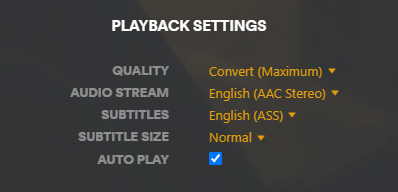
Once you’re finished, click the Settings button again or click back on the movie to close the options.
That’s it. No server settings, no transcoder witchcraft, no Docker bullshit. Just subtitles for Dad 😀
You can also change them before pressing Play
Plex also lets you choose the audio and subtitle track from the movie or episode details page before playback starts.
If more than one track is available, use the dropdown next to Audio or Subtitle and choose the one you want.
Want Plex to choose automatically?
If Dad keeps having to change the same thing every movie, Plex also has account-level audio and subtitle preferences.
In Plex Web go to your user menu in the top-right, choose Account Settings, then find Audio & Subtitle Settings.
There you can set a preferred audio language, preferred subtitle language and when subtitles should appear automatically.
Worth setting once if the answer is always “English audio, subtitles only when people start speaking Klingon” 🙂