Proxmox Unprivelliged LXC with shared Intel ARC GPU for Plex or Jellyfin transcoding

This is to create Plex and/or Jellyfin using docker within an Unprivilleged LXC container using Proxmox with access to the LXC’s host Intel ARC GPU.

I’m using Debian Trixie LXC for this example. This assumes you have:

Check the render device group on the host

ls -l /dev/dri/render*


Example output:

crw-rw---- 1 root render 226, 128 Nov 16 21:02 /dev/dri/renderD128
crw-rw---- 1 root render 226, 129 Nov 16 21:02 /dev/dri/renderD129


This is for the iGPU and the ARC GPU, the ARC GPU is renderD129. Both are part of the device GROUP 226 this will be needed later on.

Find the GID of the render group on the host – HOST_GID

getent group render


Example output:

render:x:993:


We also need the render group of the LXC – LXC_GID

getent group render


Example output:

render:x:105:


On the proxmox host, edit the config for the lxc

nano /etc/pve/lxc/<CTID>.conf


Add these lines in, remembering:
GROUP: 226
LXC_GID: 105
HOST_GID: 993
SUBUID_START: 100000 (constant)
BASE_RANGE: 65536 (constant)

lxc.cgroup2.devices.allow: c 226:0 rwm
lxc.cgroup2.devices.allow: c 226:128 rwm
lxc.mount.entry: /dev/dri/renderD128 dev/dri/renderD128 none bind,optional,create=file
lxc.cgroup2.devices.allow: c 226:129 rwm
lxc.mount.entry: /dev/dri/renderD129 dev/dri/renderD129 none bind,optional,create=file
lxc.idmap: u 0 100000 105
lxc.idmap: g 0 100000 105
lxc.idmap: u 105 993 1
lxc.idmap: g 105 993 1
lxc.idmap: u 106 100106 65430
lxc.idmap: g 106 100106 65430


This is to share both the iGPU and ARC GPU with 226 being the group.
The idmaps are rather complicated but you should be fine if you follow the rules

lxc.idmap: u 0 SUBUID_START BASE_RANGE = lxc.idmap: u 0 100000 105
lxc.idmap: g 0 SUBUID_START BASE_RANGE = lxc.idmap: g 0 100000 105

lxc.idmap: u LXC_GID HOST_GID 1 = lxc.idmap: u 105 993 1
lxc.idmap: g LXC_GID HOST_GID 1 = lxc.idmap: g 105 993 1

lxc.idmap: u (LXC_GID+1) (SUBUID_START + LXC_GID + 1) (BASE_RANGE - (LXC_GID+1)) = lxc.idmap: u 106 100106 65430
lxc.idmap: g (LXC_GID+1) (SUBUID_START + LXC_GID + 1) (BASE_RANGE - (LXC_GID+1)) = lxc.idmap: g 106 100106 65430


Save and exit the config.

We need to add the HOST_GID to the proxmox host subuid and subgid files

nano /etc/subuid


This should be as follows, then save and close

root:100000:65536
root:993:1


The same for the subgid

nano /etc/subgid
root:100000:65536
root:993:1


Restart the LXC container so the new config is loaded. Nearly there..

Docker Compose

For both Plex and Jellyfin the ARC GPU needs to be passed through into the container, add these lines into the docker compose file

    devices:
      - /dev/dri:/dev/dri

Plex

For Plex, go to Settings, Transcoder then scroll down to Hardware transcoding device your ARC should be there. Mine shows Intel DG2 [Arc A310]. If it’s not here, double check the idmaps in the LXC config from the proxmox host

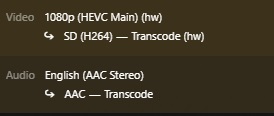
Test the transcoding by playing any video, then in the Play Settings change the quality to something lower, then go to Activity, Dashboard and see if its transcoding with a hardware (hw) tag

NOTE: Hardware transcoding does require a subscription.
 

Jellyfin

For Jellyfin, top left 3 bars, Adminstration, Dashboard
Then Playback, Transcoding
Under Hardware Acceleration select Intel Quicksync (QSV)
With QSC Device enter /dev/dri/renderD129 for your ARC GPU
(or /dev/dri/renderD128 if you dont have iGPU)

To test play a video, go to the Play Settings, lower the quality, then click Playback Info
Look through the info for Play method Transcoding.
When Jellyfin transcoding is incorrectly setup videos wont play at all, check the idmaps in the LXC config from the proxmox host

Browser VSCode docker image used to manage docker host with addon

This is a docker-compose.yaml for VS Code Server that allows host docker control in your browser window.

This is done by sharing the docker sock volume, docker-compose host folder and docker folder if you have it (for quick edits of config files) and using an environment variable to install the docker extension.

The docker-compose.yaml is from LinuxServer.io

---
services:
  code-server:
    image: lscr.io/linuxserver/code-server:latest
    container_name: code-server
    environment:
      - PUID=1000
      - PGID=1000
      - TZ=Etc/UTC
      - PASSWORD=password #optional
      - HASHED_PASSWORD= #optional
      - SUDO_PASSWORD=password #optional
      - SUDO_PASSWORD_HASH= #optional
      - PROXY_DOMAIN=code-server.my.domain #optional
      - DEFAULT_WORKSPACE=/config/workspace #optional
      - PWA_APPNAME=code-server #optional
    volumes:
      - /path/to/code-server/config:/config
    ports:
      - 8443:8443
    restart: unless-stopped


Create passwords for security, if you use your own auth and reverse proxy you can add Traefik and Authentik labels.

Note: If you use your own auth, just remove the password options.

My host docker-compose folder is found at – /home/richay/docker-compose
My host docker folder is found at – /home/richay/docker
The environment variable needed is – DOCKER_MODS=linuxserver/mods:universal-docker

Adding these in my new docker-compose will look like this

---
services:
  code-server:
    image: lscr.io/linuxserver/code-server:latest
    container_name: code-server
    environment:
      - PUID=1000
      - PGID=1000
      - TZ=Australia/Perth
      - DEFAULT_WORKSPACE=/config/workspace
      - PWA_APPNAME=code-server
      - DOCKER_MODS=linuxserver/mods:universal-docker
    volumes:
      - /home/richay/docker/code:/config
      - /home/richay/docker-compose:/config/workspace/docker-compose
      - /home/richay/docker:/config/workspace/docker
      - /var/run/docker.sock:/var/run/docker.sock
#    ports:
#      - 8443:8443
    restart: unless-stopped
    labels:
      - "traefik.enable=true"
      - "traefik.docker.network=proxy"
      - "traefik.http.routers.code-secure.entrypoints=https"
      - "traefik.http.routers.code-secure.rule=Host(`code-server.richay.au`)"
      - "traefik.http.routers.code-secure.tls=true"
      - "traefik.http.routers.code-secure.tls.certresolver=cloudflare"
      - "traefik.http.routers.code-secure.service=code"
      - "traefik.http.services.code.loadbalancer.server.port=8443"
      - "traefik.http.routers.code-secure.middlewares=authentik@file"
    networks:
      - proxy
networks:
  proxy:
    external: true


Note: Ports commented out as not needed with reverse proxy

If you dont have a reverse proxy and auth, then yours will look something like this

---
services:
  code-server:
    image: lscr.io/linuxserver/code-server:latest
    container_name: code-server
    environment:
      - PUID=1000
      - PGID=1000
      - TZ=Etc/UTC
      - PASSWORD=password #optional
      - HASHED_PASSWORD= #optional
      - SUDO_PASSWORD=password #optional
      - SUDO_PASSWORD_HASH= #optional
      - PROXY_DOMAIN=code-server.my.domain #optional
      - DEFAULT_WORKSPACE=/config/workspace #optional
      - PWA_APPNAME=code-server #optional
      - DOCKER_MODS=linuxserver/mods:universal-docker
    volumes:
      - /path/to/code-server/config:/config
      - /path/to/docker-compose:/config/workspace/docker-compose
      - /path/to/docker:/config/workspace/docker
      - /var/run/docker.sock:/var/run/docker.sock
    ports:
      - 8443:8443
    restart: unless-stopped


Head to either http://hostip:8443 if using standard or https://code-server.richay.au if using reverse proxy and enjoy direct access to your docker-compose files with the power of VS Code 🙂

Docker stack inc. ExpressVPN

docker-compose.yml

# Docker compose to set up containers for all services you need:
# VPN
#   Sonarr, Radarr, Lidarr, Qbittorrent
# Non-VPN
#   Plex, get_iplayer
# Before running docker-compose, you should pre-create all of the following folders.
# Folders for Docker State:
#  /volume1/dockerdata.             - root where this docker-compose.yml should live
#  /volume1/dockerdata/plex         - Plex config and DB
#  /volume1/dockerdata/sonarr       - Sonarr config and DB
#  /volume1/dockerdata/radarr       - Radarr config and DB
#  /volume1/dockerdata/lidarr       - Lidarr config and DB
#  /volume1/dockerdata/qbt          - QBitorrent config and DB
#  /volume1/dockerdata/prowlarr     - Prowlarr config and DB
#  /volume1/dockerdata/get_iplayer  - Get_iPlayer config and DB
# Folders for Media etc:
#  /volume1/photo                   - Root storage for photo files
#  /volume1/music                   - Root storage for music files
#  /volume1/video                   - Root storage for video files
#  /volume1/video/TV                - folder for Sonarr/Plex TV shows
#  /volume1/video/Films             - folder for Radarr/Plex Movies
#  /volume1/video/Downloads         - QBT folder for TV downloads (that Sonarr will process)
#  /volume1/video/FilmDownloads     - QBT folder for Movie downloads (that Radarr will process)
#  /volume1/video/MusicDownloads    - QBT folder for Music downloads (that Lidarr will process)
#  /volume1/video/Downloads/iPlayer - Destination folder for get_iplayer. See https://github.com/Webreaper/SonarrAutoImport
# 
# Note that Sonarr and Radarr don't necessarily need the VPN if you're using Prowlarr for the indexers. 
# But Prowlarr should be behind the VPN to avoid ISPs that block indexers.

services:
    expressvpn:
        image: polkaned/expressvpn
        container_name: expressvpn
        environment:
            - ACTIVATION_CODE=YOUR_CODE_HERE
        cap_add:
            - NET_ADMIN
        devices:
            - "/dev/net/tun:/dev/net/tun"
        privileged: true
        tty: true
        ports:
            # QBT UI Port
            - 8090:8090
            # Bittorrent port
            - 6881:6881
            - 6881:6881/udp
            # Web port
            - 8080:8080
            - 9117:9117
            # Sonarr port
            - 8989:8989
            # Radarr port
            - 7878:7878
            # Lidarr port
            - 8686:8686
            # Prowlarr port
            - 9696:9696
        command: /bin/bash
        restart: unless-stopped

    qbittorrent:
        image: linuxserver/qbittorrent
        container_name: qbittorrent
        environment:
            - PUID=1024
            - PGID=101
            - TZ=Europe/London
            - UMASK_SET=022
            - WEBUI_PORT=8090
        volumes:
            - /volume1/dockerdata/qbt/config:/config
            - /volume1/video/Seeding:/downloads
            - /volume1/video/Downloads:/tvdownloads 
            - /volume1/video/FilmDownloads:/filmdownloads 
            - /volume1/video/MusicDownloads:/musicdownloads
        network_mode: service:expressvpn
        restart: unless-stopped

    prowlarr:
        image: linuxserver/prowlarr:develop
        container_name: prowlarr
        environment:
            - PUID=1024
            - PGID=101
            - TZ=GB
        volumes:
            - /volume1/dockerdata/prowlarr:/config
        restart: unless-stopped
        network_mode: service:expressvpn
        depends_on:
            - expressvpn
            - qbittorrent
            
    sonarr:
        image: linuxserver/sonarr:latest
        container_name: sonarr_v3
        environment:
            - PUID=1024
            - PGID=101
            - TZ=GB
        volumes:
            - /etc/localtime:/etc/localtime:ro
            - /volume1/dockerdata/sonarr/config:/config
            - /volume1/video/TV:/tv
            - /volume1/video/Downloads:/downloads
        restart: unless-stopped
        network_mode: service:expressvpn
        depends_on:
            - prowlarr
            - qbittorrent

    radarr:
        image: linuxserver/radarr:latest
        container_name: radarr_v3
        environment:
            - PUID=1024
            - PGID=101
            - TZ=GB
        volumes:
            - /etc/localtime:/etc/localtime:ro
            - /volume1/dockerdata/radarr3/config:/config
            - /volume1/video/Films:/movies
            - /volume1/video/FilmDownloads:/downloads
        restart: unless-stopped
        network_mode: service:expressvpn
        depends_on:
            - prowlarr
            - qbittorrent

    lidarr:
        image: linuxserver/lidarr
        container_name: lidarr
        environment:
            - PUID=1024
            - PGID=101
            - TZ=GB
        volumes:
            - /etc/localtime:/etc/localtime:ro
            - /volume1/dockerdata/lidarr/config:/config
            - /volume1/music:/music
            - /volume1/video/MusicDownloads:/downloads
        restart: unless-stopped
        network_mode: service:expressvpn
        depends_on:
            - prowlarr
            - qbittorrent
    plex:
        container_name: plex
        image: linuxserver/plex
        devices:
            - /dev/dri:/dev/dri
        privileged: true
        environment:
            PGID: '101'
            PUID: '1024'
            VERSION: docker
        network_mode: host
        restart: unless-stopped
        volumes:
            - /volume1/dockerdata/plex:/config:rw
            - /volume1/video/TV:/tv:rw
            - /volume1/video/Films:/movies:rw
            - /volume1/music:/music:rw
    get_player:
        container_name: get_iplayer
        image: kolonuk/get_iplayer
        environment:
            PGID: '101'
            PUID: '1024'
        ports:
            - 8181:8181/tcp
        restart: unless-stopped
        volumes:
            - /etc/localtime:/etc/localtime:ro
            - /volume1/dockerdata/get_iplayer:/root/.get_iplayer:rw
            - /volume1/video/Downloads/iPlayer:/root/output:rw  

Docker Compose for Entertainment Stack

My very own docker compose stack for entertainment.

They are all in the same network of ‘entertainment’ so linking apps together is as easy as http://prowlarr:9696 – no need for ip address of prowlarr 🙂

# bazarr
# jellyfin
# overseerr
# plex
# prowlarr
# radarr
# sonarr
# tautulli
# watchtower

version: "3.6"

services:          
    bazarr:
        image: lscr.io/linuxserver/bazarr:latest
        container_name: bazarr
        environment:
            - PUID=1000
            - PGID=1000
            - TZ=Australia/Perth
        volumes:
            - bazarr_config:/config
            - /mnt/media:/mnt/media
            - /mnt/storage:/mnt/storage
            - /mnt/downloads:/mnt/downloads
        ports:
            - 6767:6767
        restart: unless-stopped
        networks:
            - myNetwork
    
    jellyfin:
        image: lscr.io/linuxserver/jellyfin:latest
        container_name: jellyfin
        environment:
            - PUID=1000
            - PGID=1000
            - TZ=Australia/Perth
            - JELLYFIN_PublishedServerUrl=192.168.0.5 # optional
        volumes:
            - jellyfin_config:/config
            - /mnt/media:/mnt/media
            - /mnt/storage:/mnt/storage
            - /mnt/downloads:/mnt/downloads
        ports:
            - 8096:8096
            - 8920:8920 # optional
            - 7359:7359/udp # optional
            - 1900:1900/udp # optional
        restart: unless-stopped
        networks:
            - myNetwork
    
    overseerr:
        container_name: overseerr
        hostname: overseerr
        image: sctx/overseerr:latest
        restart: unless-stopped
        ports:
            - 5055:5055
        volumes:
            - overseerr_config:/app/config
            - /mnt/media:/mnt/media
            - /mnt/storage:/mnt/storage
            - /mnt/downloads:/mnt/downloads
        environment:
            - LOG_LEVEL=debug
            - TZ=Australia/Perth
        networks:
            - myNetwork
                     
    plex:
        image: lscr.io/linuxserver/plex:latest
        container_name: plex
        network_mode: host
        ports:
            - 32400:32400
        environment:
            - PUID=1000
            - PGID=1000
            - TZ=Australia/Perth
            - VERSION=docker
            - PLEX_CLAIM= # optional
        volumes:
            - /mnt/plex:/config
            - /mnt/media:/mnt/media
            - /mnt/storage:/mnt/storage
            - /mnt/downloads:/mnt/downloads
        restart: unless-stopped
        # networks:
        #    - myNetwork
                    
    prowlarr:
        image: lscr.io/linuxserver/prowlarr:latest
        container_name: prowlarr
        environment:
            - PUID=1000
            - PGID=1000
            - TZ=Australia/Perth
        volumes:
            - prowlarr_config:/config
            - /mnt/media:/mnt/media
            - /mnt/storage:/mnt/storage
            - /mnt/downloads:/mnt/downloads
        ports:
            - 9696:9696
        restart: unless-stopped
        networks:
            - myNetwork
            
    radarr:
        image: lscr.io/linuxserver/radarr:latest
        container_name: radarr
        environment:
            - PUID=1000
            - PGID=1000
            - TZ=Australia/Perth
        volumes:
            - radarr_config:/config
            - /mnt/media:/mnt/media
            - /mnt/storage:/mnt/storage
            - /mnt/downloads:/mnt/downloads
        ports:
            - 7878:7878
        restart: unless-stopped
        networks:
            - myNetwork
            
    sonarr:
        image: lscr.io/linuxserver/sonarr:latest
        container_name: sonarr
        environment:
            - PUID=1000
            - PGID=1000
            - TZ=Australia/Perth
        volumes:
            - sonarr_config:/config
            - /mnt/media:/mnt/media
            - /mnt/storage:/mnt/storage
            - /mnt/downloads:/mnt/downloads
        ports:
            - 8989:8989
        restart: unless-stopped
        networks:
            - myNetwork
            
    tautulli:
        image: lscr.io/linuxserver/tautulli:latest
        container_name: tautulli
        environment:
            - PUID=1000
            - PGID=1000
            - TZ=Australia/Perth
        volumes:
            - tautulli_config:/config
        ports:
            - 8181:8181
        restart: unless-stopped
        networks:
            - myNetwork
        
    watchtower:
        container_name: watchtower
        hostname: watchtower
        image: containrrr/watchtower
        environment:
            - TZ=Australia/Perth
        restart: unless-stopped
        volumes:
            - /var/run/docker.sock:/var/run/docker.sock
        command: --cleanup
            
networks:
    myNetwork:
        name: entertainment     
           
volumes:
    bazarr_config:
    jellyfin_config:
    overseerr_config:
    prowlarr_config:
    radarr_config:
    sonarr_config:
    tautulli_config:

Portainer – Deleting broken stack throwing errors (Linux)

Every now and again a stack will break and throw and error that the docker-compose.yml does not exist so it can not be deleted..

To remove the stack a new one will need to be created. If you copy the link to the broken container, it will show an ID number.
Take note of this as it directly refers to the location of the missing docker-compose.yml file.

In the terminal, list the contents of the stored docker-compose.yml files (default):

sudo ls /var/lib/docker/volumes/portainer_data/_data/compose/


The number you took down earlier should be missing.
Let’s make a directory with your missing number:

sudo mkdir /var/lib/docker/volumes/portainer_data/_data/compose/<number>


Now we need to make up a docker-compose.yml file:

sudo nano /var/lib/docker/volumes/portainer_data/_data/compose/<number>/docker-compose.yml


Just so a change is made, I place a single # (hash / pound) to comment as to register a change.

Save the file by pressing [ctrl] + [X], then [Y], then [enter].

Now go back to your portainer webUI and the broken stack will delete!

😀