Status: CURRENT — ENVIRONMENT-SPECIFIC FIX Last reviewed: 31 August 2026 Applies to: Portainer + Authentik OAuth/OIDC behind Traefik with UFW enabled
This was the fix for my setup. If disabling UFW immediately makes the Authentik login work, the firewall path is involved. Docker and UFW interact in slightly weird ways though, so don’t assume every Docker host will behave exactly the same.
I use Authentik with Traefik for SSO, and Portainer authenticates against Authentik using OAuth/OIDC.
Authentik still has a Portainer integration guide, although that page still notes it was originally based on Authentik 2021.7.3 and Portainer 2.6.x. Portainer’s current documentation still supports a Custom OAuth provider.
This post isn’t another full Portainer/Authenik setup guide. It’s for the stupid problem I hit after the OAuth configuration looked correct.
The problem
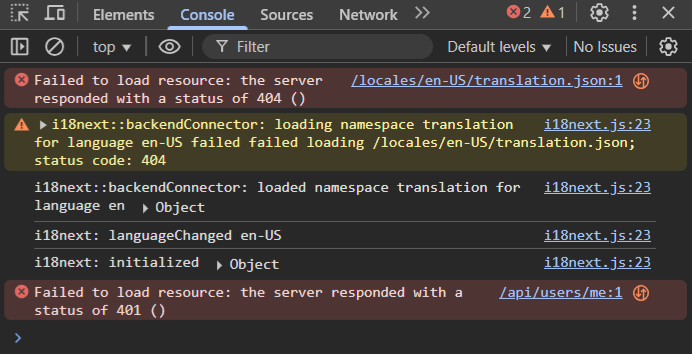
When I tried logging into Portainer through Authentik, the login failed. Inspecting the browser console showed a request returning 404, which eventually resulted in a 401 Unauthorized.
Portainer, Authentik and Traefik were already on the expected Docker networks and changing the Traefik configuration wasn’t getting me anywhere.
The thing that finally exposed the problem was testing with UFW disabled.
Check UFW first
Before changing anything, check the current firewall state:
sudo ufw status verbose
If Traefik is supposed to be reachable over HTTPS but there is no rule allowing the traffic you expect, that is worth investigating before ripping apart your Authentik configuration.
Temporarily disable UFW as a test
Diagnostic test only: disabling the firewall removes protection from the host while it is off. Don’t leave UFW disabled as the fix.
Temporarily disable UFW:
sudo ufw disable
Now try the Portainer → Authentik login again.
In my case it immediately worked. That told me the OAuth configuration itself wasn’t the problem — traffic involved in the HTTPS authentication flow was being blocked by my firewall setup.
Why being on the same Docker network didn’t save it
This caught me out because Portainer, Authentik and Traefik were on Docker networks together.
OAuth/OIDC isn’t necessarily just container-to-container traffic. Your browser is redirected between the Portainer and Authentik HTTPS URLs, and the callback returns through those hostnames. If the HTTPS path to Traefik is broken, the authentication flow can fail even though the containers themselves can communicate internally.
Docker + UFW warning: Docker’s normal published ports are implemented with Docker-managed firewall/NAT rules, and Docker documents that published container ports can bypass the normal UFW INPUT/OUTPUT rules.
Because of that, ufw allow 443 is not universally required for every Docker-published Traefik instance. If toggling UFW changes the result on your host, inspect how Traefik exposes 80/443 and any custom forwarding/firewall rules rather than assuming this exact fix applies everywhere.
Check how Traefik is listening
A quick check on the Docker host:
sudo ss -lntp | grep -E ':(80|443)\b'
You can also check Docker’s published ports:
docker ps --format 'table {{.Names}}\t{{.Ports}}'
This helps work out whether Traefik is listening directly on the host, using Docker port publishing, host networking, or something more customised.
The fix on my host
Once I confirmed UFW was involved, I re-enabled it and allowed HTTP/HTTPS for Traefik.
If you’re connected to the server remotely over SSH, make sure SSH is already allowed before enabling UFW or you can lock yourself out.
After that, the Portainer login through Authentik worked normally again.
Do you actually need port 80?
Not necessarily. If your Traefik setup only needs HTTPS and you aren’t using port 80 for an HTTP → HTTPS redirect or an ACME HTTP challenge, then you may only need:
sudo ufw allow 443/tcp comment 'Allow HTTPS for Traefik'
Open only what your setup actually needs.
If disabling UFW does NOT fix it
Then stop blaming UFW 😅 and go back through the OAuth flow.
Confirm the Portainer redirect URL exactly matches the redirect URI configured in Authentik.
Confirm Portainer’s Authorization, Access Token and Resource/UserInfo URLs point at the correct Authentik instance.
Check the Client ID and Client Secret.
Portainer’s OAuth scopes should be space-separated, not comma-separated.
Confirm both the Portainer and Authentik hostnames are reachable from the browser performing the login.
Check Traefik and Authentik logs while reproducing the login.
Portainer’s current documentation still supports Settings → Authentication → OAuth → Custom, so the general Authentik-as-OIDC-provider design remains valid.
That narrowed the problem from “something is broken in Authentik/Portainer/Traefik” to “the firewall path is involved”, which was a hell of a lot easier to troubleshoot.
Just remember that Docker’s own firewall rules can bypass UFW for normally published container ports, so treat this as a troubleshooting method and my specific fix rather than a universal Docker rule.
Status: CURRENT — MAJOR 2026 UPDATE Last reviewed: 31 August 2026 Applies to: Docker Compose, Bazarr, Jellyfin, Seerr, Plex, Prowlarr, Radarr, Sonarr and Tautulli
The original idea behind this stack is still good: put related containers on one Docker network so they can find each other by service name instead of hard-coding IP addresses. A few of the actual applications and Docker habits from the old stack are now cactus though, so this is the cleaned-up version.
My entertainment stack has always been built around one simple Docker feature:
http://prowlarr:9696
No memorising container IP addresses. No changing configs when Docker hands a container a different IP. If two containers are on the same user-defined Docker network, Docker’s internal DNS lets them talk to each other using the service/container name.
That part of the original article was spot on and is still how I’d do it today.
What’s changed since the old stack?
Overseerr is gone. The original project was archived in February 2026. Overseerr and Jellyseerr have effectively converged into Seerr, which is the current maintained project.
Watchtower is gone. The upstream project was archived in December 2025 and now explicitly says it is no longer maintained.
The top-level Compose version: "3.6" line is obsolete and ignored by modern Docker Compose.
I’ve changed application configs from anonymous/named Docker volumes to obvious bind mounts under /home/richay/docker/. Much easier to back up and inspect when something inevitably goes sideways at 1am.
Radarr/Sonarr/Bazarr now see one consistent /data tree instead of three completely different host paths.
Prowlarr and Seerr don’t need access to your entire media library, so they no longer get it. Less access, less bullshit.
Plex still uses host networking in this example because LinuxServer continues to document that as its standard setup, but its old ports: entry has been removed because Docker ignores published ports in host-network mode.
Overseerr → Seerr
The old stack used:
sctx/overseerr:latest
That repository was archived on 15 February 2026. The current maintained project is Seerr, which supports Plex, Jellyfin and Emby and still integrates with Sonarr and Radarr.
The current official Docker image is:
ghcr.io/seerr-team/seerr:latest
If you’re migrating an existing Overseerr/Jellyseerr database rather than starting fresh, use Seerr’s official migration guide. Don’t just point a random new image at the old database and hope Docker Jesus sorts it out 🙂
Watchtower has been removed
The old stack let Watchtower automatically pull and replace containers. The Watchtower maintainers archived the project on 17 December 2025 and now state that it is no longer maintained.
I don’t think unattended auto-updates are worth handing permanent Docker-socket access to an abandoned container.
Updating this stack manually is hardly an ordeal:
docker compose pull
docker compose up -d
docker image prune
LinuxServer currently recommends Diun if you want notifications that new images are available, rather than automatically updating everything while you’re asleep and waking up to seven broken services and a strong urge to throw the server into the pool.
Folder layout
I keep Compose files and persistent Docker data separate:
/home/richay/docker-compose/   # Compose files and small hand-managed config
/home/richay/docker/           # Persistent container data
The important part is that Radarr/Sonarr and your download client see the same filesystem through the same /data container path. That allows hardlinks and atomic moves instead of copying a massive file from one mount to another and then deleting the original.
Docker Compose automatically creates a default network and provides service-name DNS anyway, so technically the explicit network isn’t required if everything lives in this one Compose project.
I still like naming it entertainment because it gives me a stable network name that another stack can deliberately join later.
For example, Radarr can talk to Sonarr/Prowlarr-style services using names such as:
No container IPs required. Docker handles the internal DNS. Fucking lovely.
Plex is the odd bastard
Plex uses network_mode: host in the LinuxServer recommended configuration, so it does not join the entertainment bridge network in this example.
That also means this old combination was pointless:
network_mode: host
ports:
  - 32400:32400
Docker explicitly ignores published ports when host networking is enabled because Plex is already binding directly to the host’s network stack.
So Tautulli/Seerr should reach Plex using the Docker host’s LAN address, for example:
http://192.168.1.10:32400
Replace that with your actual Docker/Plex host address.
Jellyfin ports
The only Jellyfin port I expose by default in the stack is:
8096/tcp # normal Jellyfin HTTP web/API
LinuxServer still documents 8920/tcp, 7359/udp and 1900/udp as optional ports. I don’t bother with Jellyfin’s own HTTPS port 8920 when Traefik is handling TLS in front of it.
7359/udp is useful for local client discovery and 1900/udp is used for service/DLNA discovery. Uncomment them only if you actually use those features.
Hardware transcoding
For Intel/AMD hardware acceleration, LinuxServer’s Jellyfin image still supports mapping the host’s DRI device:
devices:
  - /dev/dri:/dev/dri
The same mapping can be used for Plex when the Docker host has the GPU available.
If you’re running Docker inside a Proxmox LXC, get the GPU working in the LXC first. Then pass it to Docker. Debugging Proxmox → LXC → Docker → Jellyfin all at once is how hobbies turn into drinking problems 🙂
Where’s qBittorrent?
I deliberately left the download client out of this stack.
If qBittorrent needs to live behind a VPN, I prefer it in a dedicated VPN/download stack rather than mixing VPN networking into Plex, Jellyfin and everything else.
The original stack wasn’t bad at all — the networking idea aged really well. It just accumulated a couple of dead projects, redundant mounts and Docker archaeology around it. A bit of a clean-out and she’s good again 🙂
Status: CURRENT — RECOVERY WORKAROUND Last reviewed: 31 August 2026 Applies to: Portainer CE/BE on Docker Standalone when a stack exists in Portainer but its stored Compose file is missing
This is still a real Portainer failure mode. Recent Portainer issues show stacks can become undeletable when the stored /data/compose/<stack-id> directory or Compose file disappears. This workaround recreates the minimum Portainer expects so the stack can be deleted normally.
Every now and again Portainer manages to get itself into a stupid state where a stack still exists in its database, but the Compose file behind it has disappeared.
You then try to delete the broken stack and Portainer throws something along the lines of:
could not get the contents of the file 'docker-compose.yml'

or

open /data/compose/234/docker-compose.yml:
no such file or directory
Excellent. The stack is broken because the file is missing, and Portainer refuses to delete the broken stack because the file is missing. Very helpful 😂.
Is this still relevant?
Yep.
This bug has been reported in Portainer for years, and there are still current examples. A July 2026 Portainer issue describes a failed Git Pull and redeploy operation leaving the stack’s /data/compose/<id> directory without the Compose file, after which the stack cannot be edited or redeployed normally.
Older reports describe the same basic workaround as this article: recreate the missing directory/file, then let Portainer perform the deletion itself.
Important: we’re touching Portainer’s persistent /data directory directly. Don’t start randomly deleting folders in there because some bloke on the internet — including me — said so. Back up Portainer first 🙂
1. Find the stack ID
The easiest clue is normally the error itself. Portainer may show a path such as:
/data/compose/234/docker-compose.yml
In that example the stack ID is:
234
You may also be able to see the stack ID in the Portainer URL when viewing the stack.
2. Find where Portainer’s /data actually lives
My old article assumed Portainer used the default named volume at:
/var/lib/docker/volumes/portainer_data/_data
That’s common, but it is not guaranteed. Portainer might be using a different named volume or a bind mount.
Ask Docker where the Portainer container’s /data mount actually points:
It does not need to recreate your entire original stack if your only goal is to get rid of the dead Portainer record.
I put a single YAML comment in it:
# recovery placeholder so Portainer can delete the broken stack
Save the file.
You can do the same thing without opening an editor:
echo '# recovery placeholder so Portainer can delete the broken stack' | sudo tee "$PORTAINER_DATA/compose/234/docker-compose.yml" >/dev/null
6. Try deleting the stack again
Go back to:
Portainer → Stacks → broken stack → Delete this stack
If the missing Compose file was the blocker, Portainer should now be able to finish deleting the stale stack record.
That’s it. We essentially gave Portainer the world’s saddest Compose file so it would finally agree to clean up its own mess 😀
What if it complains about stack.env instead?
Another reported version of this bug complains about:
failed to create env file:
open /data/compose/234/stack.env:
no such file or directory
In that case, recreating the missing stack directory may be enough because Portainer can then create stack.env itself.
If the error specifically says a required file is missing, follow the error rather than blindly manufacturing a dozen random files.
Git-backed stacks are a bit different
If the stack originally came from Git, first consider whether restoring the Compose file/repository path is the cleaner fix.
Portainer’s current Git stack handling still expects the configured Compose path to exist. Renaming/removing that file can leave Portainer unable to redeploy or delete the stack cleanly.
If you only want the stale Portainer entry gone and the Git source is already toast, the placeholder-file recovery above is still useful.
What I would NOT do
Don’t delete the entire portainer_data volume. That’s the nuclear option and wipes Portainer’s persistent state.
Don’t start editing Portainer’s database manually just to remove one broken stack unless you absolutely know what you’re doing.
Don’t delete random numbered directories from /data/compose.
Don’t assume the stack ID is the same thing as a Docker container ID.
The goal here is deliberately boring: identify the exact missing stack directory, recreate the minimum expected file, let Portainer delete it normally, fuck off and do something more interesting.
Old command from the original article
The original guide started with:
sudo ls /var/lib/docker/volumes/portainer_data/_data/compose/
That is still correct if Portainer uses a Docker named volume called portainer_data. The current article simply discovers the mount first so the same fix also works with custom volumes and bind mounts.
A very small fix for a very annoying circular error. Portainer: “I can’t delete the stack because the file doesn’t exist.” Me: “Fine, here’s a fucking comment file.” Portainer: “Oh okay then.” 🙂