Proxmox Unprivelliged LXC with shared Intel ARC GPU for Plex or Jellyfin transcoding

This is to create Plex and/or Jellyfin using docker within an Unprivilleged LXC container using Proxmox with access to the LXC’s host Intel ARC GPU.

I’m using Debian Trixie LXC for this example. This assumes you have:

Check the render device group on the host

ls -l /dev/dri/render*


Example output:

crw-rw---- 1 root render 226, 128 Nov 16 21:02 /dev/dri/renderD128
crw-rw---- 1 root render 226, 129 Nov 16 21:02 /dev/dri/renderD129


This is for the iGPU and the ARC GPU, the ARC GPU is renderD129. Both are part of the device GROUP 226 this will be needed later on.

Find the GID of the render group on the host – HOST_GID

getent group render


Example output:

render:x:993:


We also need the render group of the LXC – LXC_GID

getent group render


Example output:

render:x:105:


On the proxmox host, edit the config for the lxc

nano /etc/pve/lxc/<CTID>.conf


Add these lines in, remembering:
GROUP: 226
LXC_GID: 105
HOST_GID: 993
SUBUID_START: 100000 (constant)
BASE_RANGE: 65536 (constant)

lxc.cgroup2.devices.allow: c 226:0 rwm
lxc.cgroup2.devices.allow: c 226:128 rwm
lxc.mount.entry: /dev/dri/renderD128 dev/dri/renderD128 none bind,optional,create=file
lxc.cgroup2.devices.allow: c 226:129 rwm
lxc.mount.entry: /dev/dri/renderD129 dev/dri/renderD129 none bind,optional,create=file
lxc.idmap: u 0 100000 105
lxc.idmap: g 0 100000 105
lxc.idmap: u 105 993 1
lxc.idmap: g 105 993 1
lxc.idmap: u 106 100106 65430
lxc.idmap: g 106 100106 65430


This is to share both the iGPU and ARC GPU with 226 being the group.
The idmaps are rather complicated but you should be fine if you follow the rules

lxc.idmap: u 0 SUBUID_START BASE_RANGE = lxc.idmap: u 0 100000 105
lxc.idmap: g 0 SUBUID_START BASE_RANGE = lxc.idmap: g 0 100000 105

lxc.idmap: u LXC_GID HOST_GID 1 = lxc.idmap: u 105 993 1
lxc.idmap: g LXC_GID HOST_GID 1 = lxc.idmap: g 105 993 1

lxc.idmap: u (LXC_GID+1) (SUBUID_START + LXC_GID + 1) (BASE_RANGE - (LXC_GID+1)) = lxc.idmap: u 106 100106 65430
lxc.idmap: g (LXC_GID+1) (SUBUID_START + LXC_GID + 1) (BASE_RANGE - (LXC_GID+1)) = lxc.idmap: g 106 100106 65430


Save and exit the config.

We need to add the HOST_GID to the proxmox host subuid and subgid files

nano /etc/subuid


This should be as follows, then save and close

root:100000:65536
root:993:1


The same for the subgid

nano /etc/subgid
root:100000:65536
root:993:1


Restart the LXC container so the new config is loaded. Nearly there..

Docker Compose

For both Plex and Jellyfin the ARC GPU needs to be passed through into the container, add these lines into the docker compose file

    devices:
      - /dev/dri:/dev/dri

Plex

For Plex, go to Settings, Transcoder then scroll down to Hardware transcoding device your ARC should be there. Mine shows Intel DG2 [Arc A310]. If it’s not here, double check the idmaps in the LXC config from the proxmox host

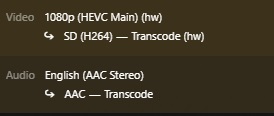
Test the transcoding by playing any video, then in the Play Settings change the quality to something lower, then go to Activity, Dashboard and see if its transcoding with a hardware (hw) tag

NOTE: Hardware transcoding does require a subscription.
 

Jellyfin

For Jellyfin, top left 3 bars, Adminstration, Dashboard
Then Playback, Transcoding
Under Hardware Acceleration select Intel Quicksync (QSV)
With QSC Device enter /dev/dri/renderD129 for your ARC GPU
(or /dev/dri/renderD128 if you dont have iGPU)

To test play a video, go to the Play Settings, lower the quality, then click Playback Info
Look through the info for Play method Transcoding.
When Jellyfin transcoding is incorrectly setup videos wont play at all, check the idmaps in the LXC config from the proxmox host

Portainer and Authentik / Traefik failling to login due to UFW

I use Authentik with Traefik. This is also assuming you followed the official Authentik intergration guide found here.

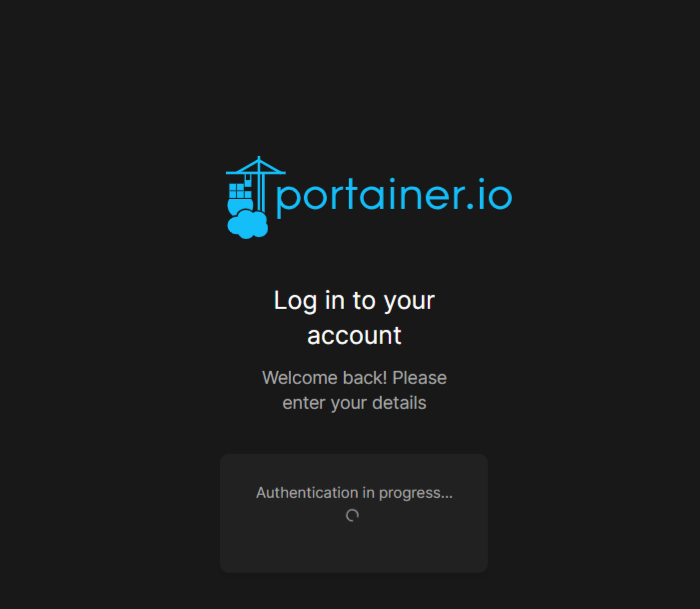
This is the screen that I had when logging into Authentik:


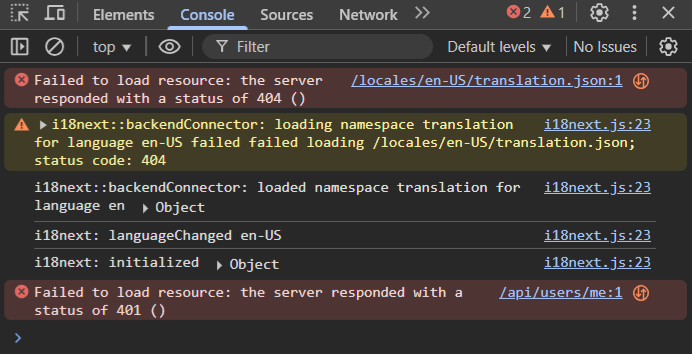
On the right there is a 404 error when inspecting the console, which leads to the 401 error – unauthorized. After lots of trial and error, turns out it was due to Uncomplicated Firewall (UFW) blocking the port access of 443 (https).

They are both on the same docker network, I also use labels for traefik. I tried using my config setup in traefik with no luck either. Disabling UFW to test the login process.

sudo ufw disable


This worked! So all that was left was to re-enable authentik and add in the two rules for port 80 (http) and port 443 (https) then reload UFW to enforce the changes

sudo ufw enable
sudo ufw allow 80/tcp comment 'Allow HTTP for Traefik'
sudo ufw allow 443/tcp comment 'Allow HTTPS for Traefik'
sudo ufw reload

Proxmox cluster with Traefik

With Traefik you can load balance between the different nodes of your cluster with one web page.

ie, https://proxmox.richay.au could access either one of the three nodes I have available, but it comes with one issue, you wont be able to use the shell as the websocket it uses needs to be upgraded in Traefik.

This is my dynamic config.yaml in traefik

http:
  routers:
    proxmox:
      entryPoints:
        - "https"
      rule: "Host(`proxmox.richay.au`)"
      middlewares:
        - https-redirectscheme
        - websocket-upgrade
      tls: {}
      service: proxmox
 
  services:
    proxmox:
      loadBalancer:
        sticky:
          cookie: {}
        servers:
          - url: "https://10.10.10.1:8006" # IP of node 1
          - url: "https://10.10.10.2:8006" # IP of node 2
          - url: "https://10.10.10.3:8006" # IP of node 3
        passHostHeader: true

  middlewares:
    https-redirectscheme:
      redirectScheme:
        scheme: https
        permanent: true
    websocket-upgrade:
      headers:
        CustomRequestHeaders:
          Upgrade: websocket
          Connection: Upgrade


This will allow the proxmox shells to work 🙂

Authentik and Home Assistant with working Companion App solution using Traefik proxy

I absolutely love the fact I can log into authentik and then bypass all app login screens for instant access. This was a slight challenge with Home Assistant as placing this behind Authentik behind this would break the phone companion app. Here is a quick guide on how I overcame this.

This was solved by setting two pathways leading back to my home assistant in traefik, one being behind authentik for the SSO, and the other using the default home assistant login screen for the companion app.

This requires a few things first:
Traefik setup with dynamic config
HTTP Header Authentication integration for home assistant found here
Authentik setup with provider and application, instructions found here

The added lines I used in configuration.yaml in Home Assistant

http:
  use_x_forwarded_for: true
  trusted_proxies:
    - 10.10.10.0/24 # Change to your home network
    - 172.22.0.0/16 # Change to your traefik proxy network

auth_header:
  username_header: X-authentik-username


The config.yaml for my traefik
Please not there is two routers for the one service, one being behind Authentik (/auth) and the other bypassing Authentik. There is also a path prefix for the outpost so there is no 404 error.

http:
  routers:
    # Router for SSO - PROTECTED by Authentik
    home-assistant:
      entryPoints:
        - "https"
      rule: "Host(`home-assistant.richay.au`) && PathPrefix(`/auth`) && !PathPrefix(`/auth/token`) || PathPrefix(`/outpost.goauthentik.io`))" # Change host domain
      middlewares:
        - https-redirectscheme
        - authentik
      tls: {}
      service: home-assistant
    # Router for Companion App - UNPROTECTED by Authentik
    home-companion:
      entryPoints:
        - "https"
      rule: "Host(`home-companion.richay.au`) || Host(`home-assistant.richay.au`)" # Change host domain
      middlewares:
        - https-redirectscheme
      tls: {}
      service: home-assistant 
 
  services:
    home-assistant:
      loadBalancer:
        servers:
          - url: "http://10.10.10.10:8123" # change this to your IP of your Home Assistant
        passHostHeader: true

  middlewares:
    authentik:
      forwardAuth:
        address: "http://authentik-server:9000/outpost.goauthentik.io/auth/traefik"
        trustForwardHeader: true
        authResponseHeaders:
          - X-authentik-username
          - X-authentik-groups
          - X-authentik-email
          - X-authentik-name
          - X-authentik-uid
          - X-authentik-jwt
          - X-authentik-meta-jwks
          - X-authentik-meta-outpost
          - X-authentik-meta-provider
          - X-authentik-meta-app
          - X-authentik-meta-version
          - authorization
    https-redirectscheme:
      redirectScheme:
        scheme: https
        permanent: true


When you select your server on the companion app, choose the
https://home-companion.richay.au option. This will allow the app to work.

When using a web browser, use https://home-assistant.richay.au for SSO access using Authentik.

Ansible – updating proxmox host kernel with LXC shared GPU

This is to automate the updating of proxmox host when there is a kernel update which will break the LXC link to the GPU.

It just requires you to reinstall the graphics driver and do a reboot otherwise.

This is after you have done an update / upgrade of your proxmox host.
You will have to change the IP Addresses for your setup.

For me..
10.77.69.2 – Proxmox Host
10.77.69.103 – LXC Plex

########
- hosts: nvidia
  become: true
  become_user: root
  tasks:
    - name: Wait for 10.77.69.2 to become available
      wait_for_connection:
        delay: 5
        timeout: 300

    - name: Check if NVIDIA kernel module is loaded
      shell: lsmod | grep -q '^nvidia'
      register: nvidia_module_check
      ignore_errors: true

    - name: Set NVIDIA module check result as fact
      set_fact:
        nvidia_module_rc: "{{ nvidia_module_check.rc }}"

    - name: Reinstall NVIDIA driver if module is not loaded
      shell: sh /root/NVIDIA-Linux-x86_64-535.154.05.run --silent
      args:
        executable: /bin/bash
      when: nvidia_module_check.rc != 0

    - name: Set fact if NVIDIA driver was installed
      set_fact:
        driver_installed: true
      when: nvidia_module_check.rc != 0

    - name: Reboot system if NVIDIA driver was reinstalled
      reboot:
      when: nvidia_module_check.rc != 0

    - name: Wait for 10.77.69.2 to become available after reboot
      wait_for_connection:
        delay: 10
        timeout: 600
      when: nvidia_module_check.rc != 0

########
- hosts: plex
  become: true
  become_user: root
  tasks:
    - name: Install NVIDIA driver in LXC
      shell: sh /root/NVIDIA-Linux-x86_64-535.154.05.run --no-kernel-module --silent
      args:
        executable: /bin/bash
      when: hostvars['10.77.69.2'].driver_installed | default(false)

    - name: Reboot 10.77.69.103
      reboot:
      when: hostvars['10.77.69.2'].driver_installed | default(false)

    - name: Wait for 10.77.69.103 to become available
      wait_for_connection:
        delay: 10
        timeout: 300
      when: hostvars['10.77.69.2'].driver_installed | default(false)


This will check to see if the kernels for nvidia (my gpu) has been loaded, if not it will reinstall in silent mode. This will also flag a GPU install in ansible to also reinstall the GPU driver in the LXC, only if it needs though.

ExpressVPN – Hourly random smart server reconnect (Linux)

This will force a disconnect, then a re-connect to a random server hourly. There are a few other options included. The original article can be sourced here.

Firstly open a terminal and type:

sudo crontab -e


This will open the CRON list where you can set script to run at certain intervals. In this case we want this event to happen on reboot.
Add at the bottom:

# MY CRON FILE
MAILTO=""
@reboot expressvpn connect


Now save the file by pressing [ctrl] + [X], then [Y], then [enter].
Now reboot your system.

sudo reboot


Once again in the terminal, type:

expressvpn status


This will tell you which server you are connected too. To make this switch locations automatically, type this in the terminal:

sudo nano /usr/sbin/smartexpressvpn.sh


Now paste this into the blank file:

expressvpn disconnect
expressvpn refresh

# Chose any of the below
# This will make you hop all over the world
VPN=$(expressvpn list all | tail -n +4 | awk '{ print $1 }' | shuf -n 1)

# This will make you hop around using recommended connections
# VPN=$(expressvpn list all | grep ‘\Y$’ | tail -n +4 | awk '{ print $1 }' | shuf -n 1)

# Use a custom list to connect to servers in the vicinity.
# VPN=$(cat /mnt/scripts/conf/expressvpn_EU_list.txt | tail -n +4 | awk '{ print $1 }' | shuf -n 1)

expressvpn connect $VPN


Save the file by pressing [ctrl] + [X], then [Y], then [enter].
Now we need to make this bash script file executable and we do that by running the following commands from terminal:

sudo chmod +x /usr/sbin/smartexpressvpn.sh


If you want to test the script, type this in the command line:

/usr/sbin/smartexpressvpn.sh


Check where you are connected by typing:

expressvpn status


This should have changed!
Now to make this run every hour of every day automagically!

sudo crontab -e


Modify the contents to:

# MY CRON FILE
MAILTO=""
@reboot expressvpn connect
0 */1 * * * /usr/sbin/smartexpressvpn.sh


Save the file by pressing [ctrl] + [X], then [Y], then [enter].

You’re done!
Every hour on the hour your expressvpn should change locations.
Thanks to Ubuntu 101 for the guide and the commenters for cleaning up the code.

😀

Accessing Kali Linux through Guacamole SSH

SSH failed to connect my Kali through guacamole. Reading up, I found this article from 3rd May 2022 on reddit.

“Knowing very little about any of this, but it seems like Guacamole only supports ssh-dss and ssh-rsa, and both have been disabled in Ubuntu.

DSS was removed 8 years ago and it seems from my quick google that RSA has been deprecated, so hopefully Guacamole updates sometime soon.

In the meantime a workaround is adding “HostKeyAlgorithms +ssh-rsa” to the end of /etc/ssh/sshd_config on the Ubuntu machine and restart sshd. Note: I don’t have an understanding of the security implications of this, so use at your own risk”

-UniqueCSX


This involves editing sshd_config

sudo nano /etc/ssh/sshd_config


Then adding

HostKeyAlgorithms +ssh-rsa


[ctrl] + [x] to exit, [y] to overwrite, [enter] to confirm

Use at your own risk, hopefully by the time you read this the roundabout way wont be needed.

😀

Nextcloud – NAS storage 0770 error

Common Nextcloud first run error. Usually appears after changing the /data location.

In my case, it was when I setup Nextcloud to use my Windows NAS.

The easiest solution is to edit the config.php file on your install server (change the path to reflect your install location).

A) For regular installation:

sudo nano /var/www/nextcloud/config/config.php


B) For Docker

sudo docker exec -it nextcloud /bin/bash
nano /config/www/nextcloud/config/config.php


In here we can add the line

'check_data_directory_permissions' => false,

[ctrl] + [x], then [y] to save, then [enter] to write and close.

This will skip the permission check and allow use of the mounted storage.
Much easier way than dealing with permissions and messing with fstab.

😀

Windows share with Linux (fstab)

One major hurdle I had when starting off was being able to use my NAS (Network Attached Storage) with my Linux VM’s (Virtual Machines).

Debian 11 is my flavour of choice, with cifs-utils being installed as a prerequisite.

Linux needs to mount the shares on bootup to achieve maximum uptime and autonomy. I achieved in editing the fstab file.

sudo nano /etc/fstab


This allows me to edit the Linux system’s filesystem table.
Scrolling down to the bottom, I added these lines, replacing everything in the brackets with my configuration.

//[URL]/[sharename] /media/[mountpoint] cifs vers=3.0,credentials=/home/[username]/.sharelogin,iocharset=utf8,file_mode=0777,dir_mode=0777,uid=[username],gid=[username],nofail 0 0


To not have my share login info so easily accessible, I placed them in them in a file called ‘credentials’ located in the /home/[username] directory with permissions -rw------- and it is owned by my user.

sudo nano /home/[username]/.sharelogin


The layout of this file:

username=[username]
password=[password]
domain=[domain]


I currently only use username and password for my shares so remove the domain altogether from the file.

😀